Face Recognition Locker for Office Buildings — Contactless Smart Storage, Card-Free Access
You walk into the office on Monday morning, coffee in one hand, laptop bag over the shoulder, a stack of papers under your arm. You get to the locker bank and pat your pockets — no access badge. It’s on the desk. Again. You walk back to the front door, borrow a temporary card, log your name in a paper book, and the day starts ten minutes late.
A face recognition locker for office buildings removes the badge step entirely. Walk up, look at the camera, the assigned door clicks open. No card, no fob, no PIN. For a 500-person office with rotating contractors, visitors, and remote workers coming in for a meeting, that’s a different operating model.
How Face Recognition Unlocks a Locker
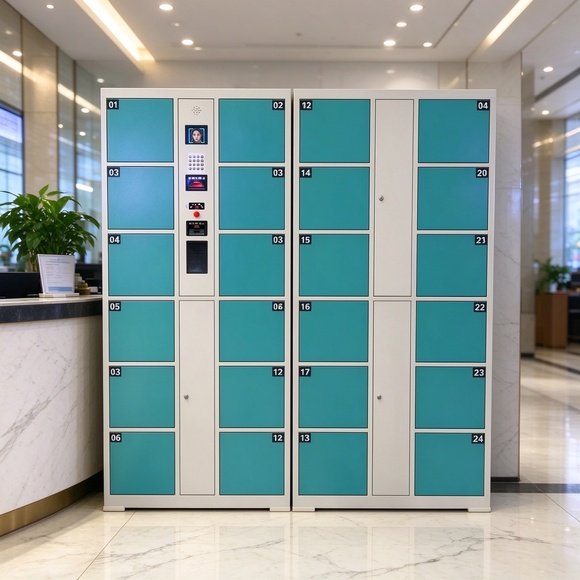
The unit uses a dual-camera module: a structured-light camera that maps your face in 3D, paired with an infrared sensor that confirms it’s a live person and not a photo held up to the screen. Registration takes about five seconds — stand in front of the panel, hold still, done. The system stores a facial template, not a photograph, which matters for data privacy discussions.
When you return, the camera recognizes you in under a second and opens the compartment assigned to your profile. No touching the screen, no fumbling with a card reader. The LCD shows your name and compartment number while it unlocks.
Recognition rate is rated above 99%. It works with glasses, hats, and mild facial changes. It does not work if you wear a mask covering the nose and mouth — the system falls back to a PIN or admin override in that case.
Office Buildings: Who Actually Needs This
Not every office needs face recognition. Here’s where it earns the premium price tag:
- Multi-tenant office towers. Different companies lease floors. A shared locker bank in the ground-floor lobby serves all tenants, and face recognition means you don’t have to issue and reissue cards every time a company moves in or out.
- Hospitals and clinics. Doctors and nurses are washing hands every ten minutes. They don’t want to touch a card reader or a keypad. Face recognition is fully contactless, which supports infection-control protocols.
- Government service halls. Members of the public come in for a single appointment. They don’t need an account. A receptionist registers their face at check-in, they drop their bag, attend their appointment, and leave.
- Co-working spaces. Members come and go. Some visit once a week, some every day. The locker bank adapts without a front-desk person managing sign-out sheets.
Card-Free vs. Card-Based: The Real Cost Math
A card-based locker system works, but it carries hidden costs. Every new hire needs a card. Every departing employee needs their card deactivated. Lost cards mean an admin visit to the locker bank to release the compartment. Contractors and visitors need temporary cards that come back to the front desk at the end of the day.
Face recognition removes the card lifecycle entirely. Onboarding is a 30-second scan. Offboarding is deleting the profile in the admin panel. A lost card no longer means a stuck compartment. The front desk stops being the locker help desk.
That said, card systems are cheaper upfront. If your building has 40 employees who never change and your turnover is low, cards are fine. If your tenant mix changes quarterly, or you have a steady stream of visitors, face recognition pays for itself in reduced admin hours.
Door Configurations for Office Flow
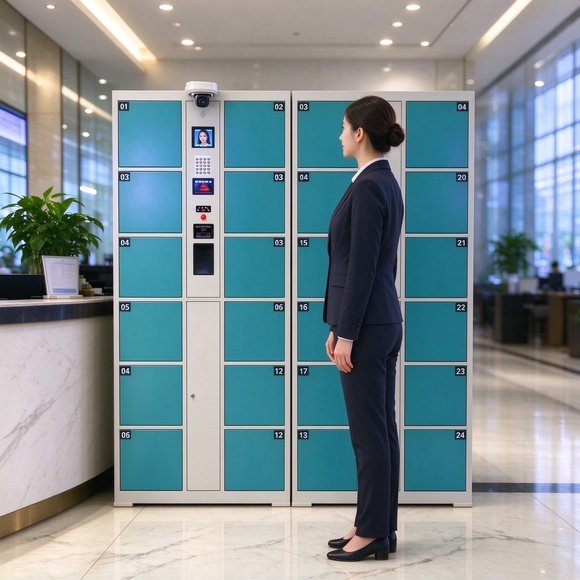
Office lockers need a mix of compartment sizes: small for purses and backpacks, medium for gym bags and overnight cases, tall for coats and winter gear. The modular system supports 12, 24, 36, or 48 doors as a base cabinet, with sub-cabinets that expand alongside.
| Configuration | Best For | Typical Office Size |
|---|---|---|
| 12-door | Small branches, 20–40 staff | Shared lobby, day-use lockers |
| 24-door | Mid-size offices, 100–200 staff | Floor-pantry adjacent locker bank |
| 36-door | Multi-tenant towers | Ground-floor shared storage |
| 48-door+ | Hospitals, government halls | Peak-day visitor and staff storage |
Each compartment is roughly 270 mm tall by 300–460 mm wide. For staff who bring gym gear, order a few tall compartments mixed in — they fit a change of clothes and towel without squishing.
Admin Controls: What the Facility Manager Sees
The admin panel runs on the same touch screen, or on a web dashboard for larger installs. The manager can:
- Register a new user’s face in seconds
- Release a compartment remotely if a user is stuck
- View an audit log of every door event with timestamp and user
- Set access hours — lockers open during business hours only, for example
- Switch a user from face recognition to PIN or card if the camera can’t read them
The audit log matters in offices. If something goes missing from a shared locker, the manager can pull the record: who opened which compartment, when, and for how long. It’s a deterrent as much as a feature.
Privacy: The Question Every Office Asks First
Employees push back when you mention facial recognition in the workplace. The honest answers help:
The system stores a mathematical template, not a photograph. The template can’t be reverse-engineered into a face. It lives on the local control board, not in a cloud server. When you delete a user, the template is gone.
For European deployments, check local data-protection rules — some jurisdictions require employee consent or a privacy impact assessment before facial recognition in the workplace. We can supply the technical documentation for your legal team, confirmed in the quotation.
Power Outage and Failure Modes
Every smart locker needs a plan for when the electronics fail. This one has a mechanical override key for the facility manager — each door opens manually during a blackout. A backup battery module keeps the control board alive for short interruptions.
If a user’s face isn’t recognized — new glasses, a cold, bad lighting — they tap in a PIN on the acrylic keypad. The system logs the fallback. If the camera itself fails, the admin can release the door from the web dashboard.
Quick Answers
Q: Does it work in low light?
A: The infrared sensor handles normal lobby lighting. Very dark rooms need the cabinet’s own screen backlight, which is built in.
Q: How long does registration take?
A: Under five seconds per person. A 50-person team gets onboarded in an afternoon.
Q: Can visitors use it without an account?
A: Yes. The receptionist registers them at check-in. When they leave, the profile deletes automatically at end of day.
Q: What voltage and plug type?
A: 110V or 220V confirmed in the quotation, with your local plug type specified on the order.
Q: What warranty is included?
A: One year on the full cabinet. The face-recognition module and control board are covered for replacement within that period.
Get Your Quote
Tell us your office headcount, the number of compartments you’re leaning toward, and your target voltage. We’ll send a spec sheet and FOB or CIF pricing within 24 hours. Multi-floor office rollouts and hospital or government projects get volume terms confirmed in the quotation.